A deck of keys for the computer you code on
Tap a key on your phone or tablet, and your Mac, Windows or Linux computer opens the app, presses the shortcut, runs the command or types the code. AuthDeck also keeps your two-factor codes and your projects' .env secrets on the device in your hand.
Free, with no account. Version 0.4.1.
On your computer
One tap for the things you do all day
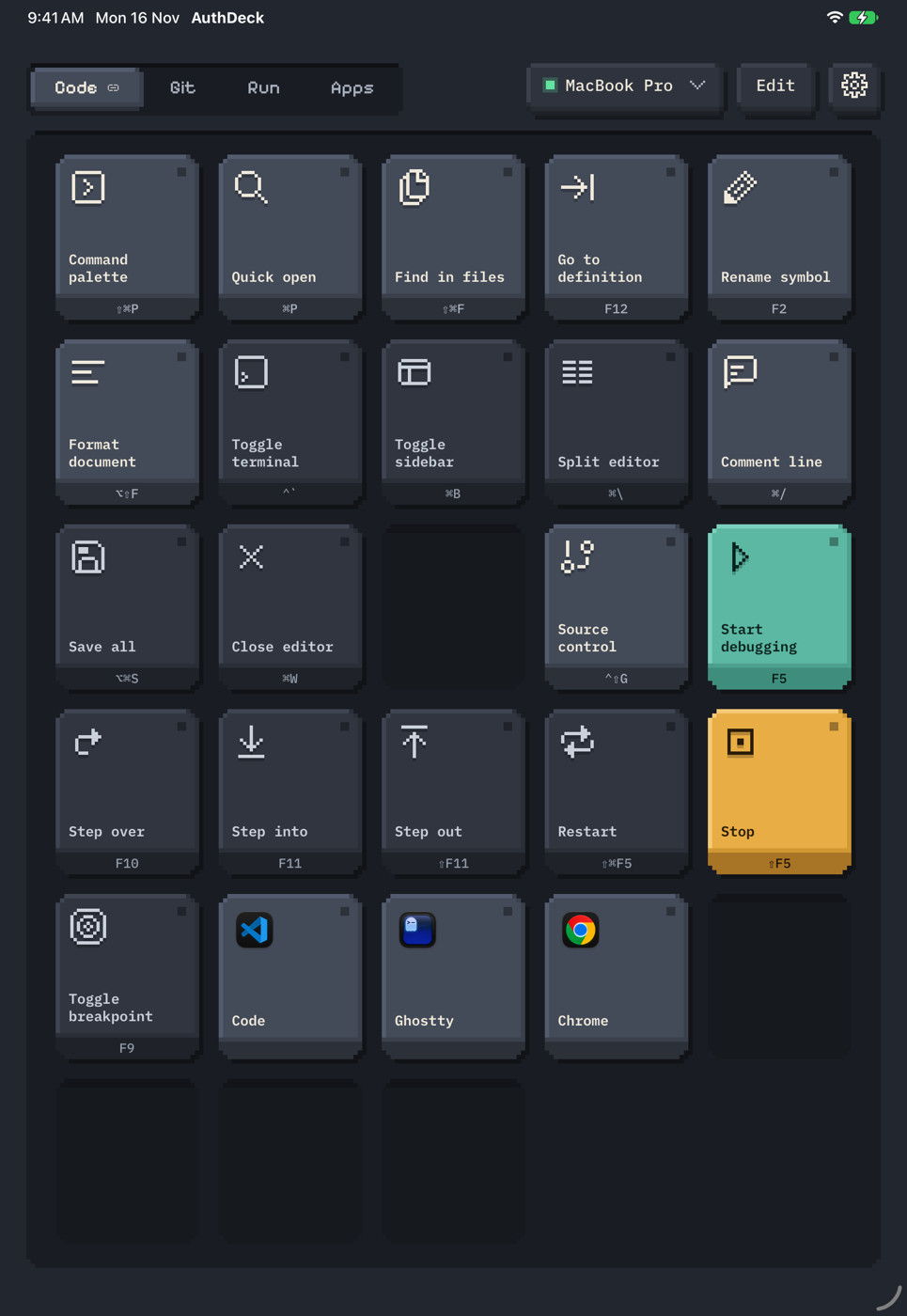
You start with four pages, Code, Git, Run and Apps, set up for VS Code on your system. Tap Edit to move keys around, change what they do or add your own. Long-press a key for its menu.
- Open an app. The picker lists what's installed on your computer, icons included.
- Press a shortcut, after bringing a chosen app to the front if you like.
- Run a command in a new terminal window, or quietly in the background with its output and exit code on the key.
- Type a snippet of text.
- Open a link, a file or a folder.
- Do several of these in a row.
- Switch pages on its own when you change apps on your computer.
Three colour schemes come with it: Graphite, Paper and Tide. The squares at the top of this page switch between them.
Two-factor codes that type themselves
Your codes are made on your phone or tablet, with no network needed. Put one on the deck and tap it: the computer types the digits into whatever field you're in.
- Works with most sites (TOTP), counter codes (HOTP) and Steam Guard.
- Add an account by scanning its QR code, typing its key, or importing from Google Authenticator's Transfer accounts code.
- The computer gets only the digits, only when you tap. It keeps an encrypted backup of your vault that it can't read.
- A 12-word recovery phrase brings your codes back on a new phone.
- Lock the app with Face ID, your fingerprint or your passcode.
Codes
- GitHub[email protected]––– –––
- Cloud consoleadmin––– –––
- SteamSteam Guard–––––
Tap a code key, and only these digits reach the computer.
Your .env secrets, in the repo and released from your phone
An env set keeps a project's secrets in its own git repo, in one file. Names are readable, values are encrypted so only your team's phones and tablets can open them, and every line is signed by the device that wrote it.
~/code/web authdeck env run -- npm run dev
web: 12 variables, signatures check out (rev 7, epoch 2)
Asking Pixel 8 to release them… waiting 0:03
Pixel 8 allowed web for 15 minutes (until 11:58).

> [email protected] dev
> vite

  Local: http://localhost:5173/
MacBook Pro wants web's .env
From npm run dev
Ends in 0:52 if you don't answer
- Values go into one process.
authdeck env runasks your phone, and nothing is written to disk. Allow for 15 minutes lets the next runs on that computer through without a tap. - A lost laptop gives up only ciphertext. The computer never keeps a set's key, so all it holds is the encrypted file and any
.envyou pulled onto it. - Teammates join from the repo. They ask with a request file, and before you approve, you each read out six key words and pick the other's from three choices.
- Removing someone makes a new key and lists the variables to rotate. The repo carries the file; there's no server.
Set up in three steps
-
Install AuthDeck Agent on your computer
It sits in the menu bar or tray and does what your keys ask. macOS, Windows and Linux.
-
Install AuthDeck on your phone or tablet
Android today. iPhone and iPad aren't on the App Store yet.
-
Pair them
The agent shows a QR code and a six-digit PIN. Scan the code, or pick your computer and type the PIN. Both need to be on the same Wi-Fi.
Your devices, your network, no account
The app talks straight to the agent over your own Wi-Fi. The link is encrypted, and both ends prove who they are with keys exchanged when you pair. Each PIN attempt is one guess, and three wrong PINs bring a new PIN and a pause.
A paired device can run commands as you, so pair only devices you own, and unpair a lost one from the agent's window.
What it doesn't protect against
Other programs running as you on the same computer can change the agent's settings and paired devices. Keep that computer free of malware.
The builds aren't signed with paid certificates yet, so your system asks for an extra click the first time you open them. The steps are under the downloads.
Download AuthDeck 0.4.1
You need both: the agent on your computer, and the app on your phone or tablet.
AuthDeck Agent, for your computer
| System | File | SHA-256 | Download |
|---|---|---|---|
| macOSApple silicon (M1 and later) | AuthDeck-Agent-0.4.1-mac-arm64.dmg120 MB | Download | |
| macOSIntel | AuthDeck-Agent-0.4.1-mac-x64.dmg127 MB | Download | |
| WindowsWindows 10 and 11, 64-bit | AuthDeck-Agent-0.4.1-win-x64.exe122 MB | Download | |
| LinuxAppImage, for most distributions | AuthDeck-Agent-0.4.1-linux-x86_64.AppImage126 MB | Download | |
| LinuxDebian, Ubuntu and Pop!_OS (.deb) | AuthDeck-Agent-0.4.1-linux-amd64.deb102 MB | Download |
AuthDeck, for your phone or tablet
| System | File | SHA-256 | Download |
|---|---|---|---|
| AndroidMost phones and tablets (64-bit ARM) | AuthDeck-0.4.1-android-arm64.apk21 MB | Download | |
| AndroidEvery Android device, larger download | AuthDeck-0.4.1-android.apk114 MB | Download | |
| iPhone and iPadUnsigned IPA, for sideloading tools | AuthDeck-0.4.1-ios-unsigned.ipa12 MB | Download |
Click a SHA-256 to copy it, or get every checksum in SHA256SUMS.
The first time you open it
- macOS
- Open the app once, then go to System Settings › Privacy & Security and click Open Anyway. Turn on AuthDeck Agent under Accessibility when macOS asks: shortcuts and typing need it.
- Windows
- When SmartScreen stops it, click More info, then Run anyway. When the firewall asks, allow it on private networks.
- Linux
- Shortcuts and typing need
xdotoolon X11, orwtypeorydotoolon Wayland. - Android
- Open the APK on the device. Android asks you to allow installs from your browser first.
- iPhone and iPad
- Not on the App Store yet. The unsigned IPA is for sideloading tools that sign it with your own Apple ID.